Case study · 2022
Apple Music
Overview
This independent 2022 concept grew from my own experience switching between Apple Music and Spotify. I preferred Spotify, despite using Apple devices, and used that frustration to explore possible changes to Apple Music. It was a starting point for a design exercise, not representative user research.
Friends and peers I knew often used Spotify, including people with iPhones. Those informal observations raised a question for me: what might make Apple Music more compelling within the Apple ecosystem? They do not establish how common that preference was.
This concept explores two possible improvements: a clearer place to find loved music and a way to share a listening queue. The project focused on young adults, but the evidence gathered here does not establish that this age group was underserved or likely to switch.
Problem
The Age Disparity
A 2018 Statista figure cited in my original research reported that 17% of Apple Music users in the U.S. were ages 18–24, compared with 26% of Spotify users. These historical figures offered context for the concept; they do not show current audience composition or, by themselves, prove that either service was failing to serve young adults.

This is a small percentage, especially compared to Spotify’s 26%, of users each month that are not being properly catered to. To be more precise, for Apple Music, the number from 2018 comes to around 8.42 million users. For Spotify in that same year, the numbers boil down to 46.8 million users in this age bracket. This is over 5x the amount of young Spotify users vs Apple Music users. While it looks like Spotify’s growth in this age range is not slowing down, there are a few simple solutions that can be implemented to put Apple ahead.
Where’d All the Features Go?
Let’s be honest, if you’ve ever used Apple Music, you’ve noticed the absence of new features that enhance the user experience. The service launched way back in 2015. Since then, features have been taken away instead of added. When it launched, one of its headlining features was ‘Connect.’
It’s going to be very powerful for musicians. Can you imagine being an up and coming artist and being able to share your music on the biggest platform in the world that people already have?
Jimmy Iovine — Apple WWDC 2015
A way for you to easily keep up to date with your favorite artists. It was pretty much a social media just for artists. Only a year later, the feature was replaced by the browse tab, pulled, and never seen again. This seemed like such a knee-jerk reaction. Putting so much emphasis on a feature during the keynote and pulling it just because in one year it wasn’t seeing the engagement or numbers Apple expected. It is definitely concerning. Even though there have been UI shuffles, new features have been few and far between. The only notable feature that I can even think of from using Apple Music for the past 7+ years is the introduction of spacial and lossless audio, and that’s only if you have compatible headphones and good enough bandwidth. That’s it.
Process
Hearing from the People
I invited friends and peers who used both services to add comparisons to a Google Jamboard. This informal exercise helped me collect ideas, but it was a small convenience sample, not representative research or a usability study.
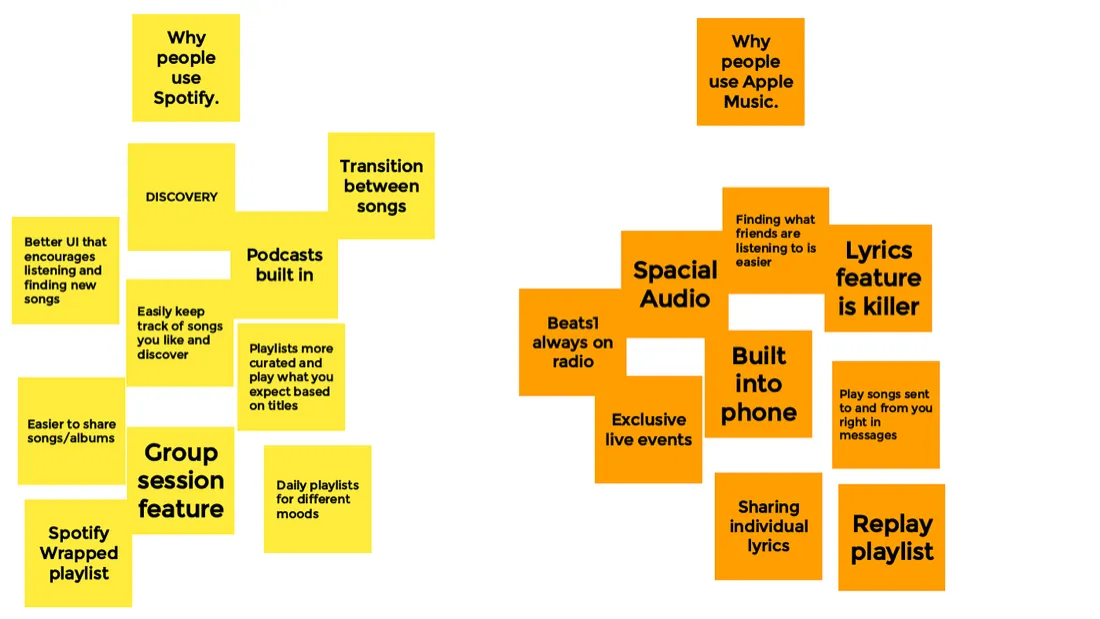
I looked at these differences and tried to put them in priority order from most to least important. Then, I decided to also create a list of the most achievable desired features from most desired to least. These lists are from Apple’s point of view.
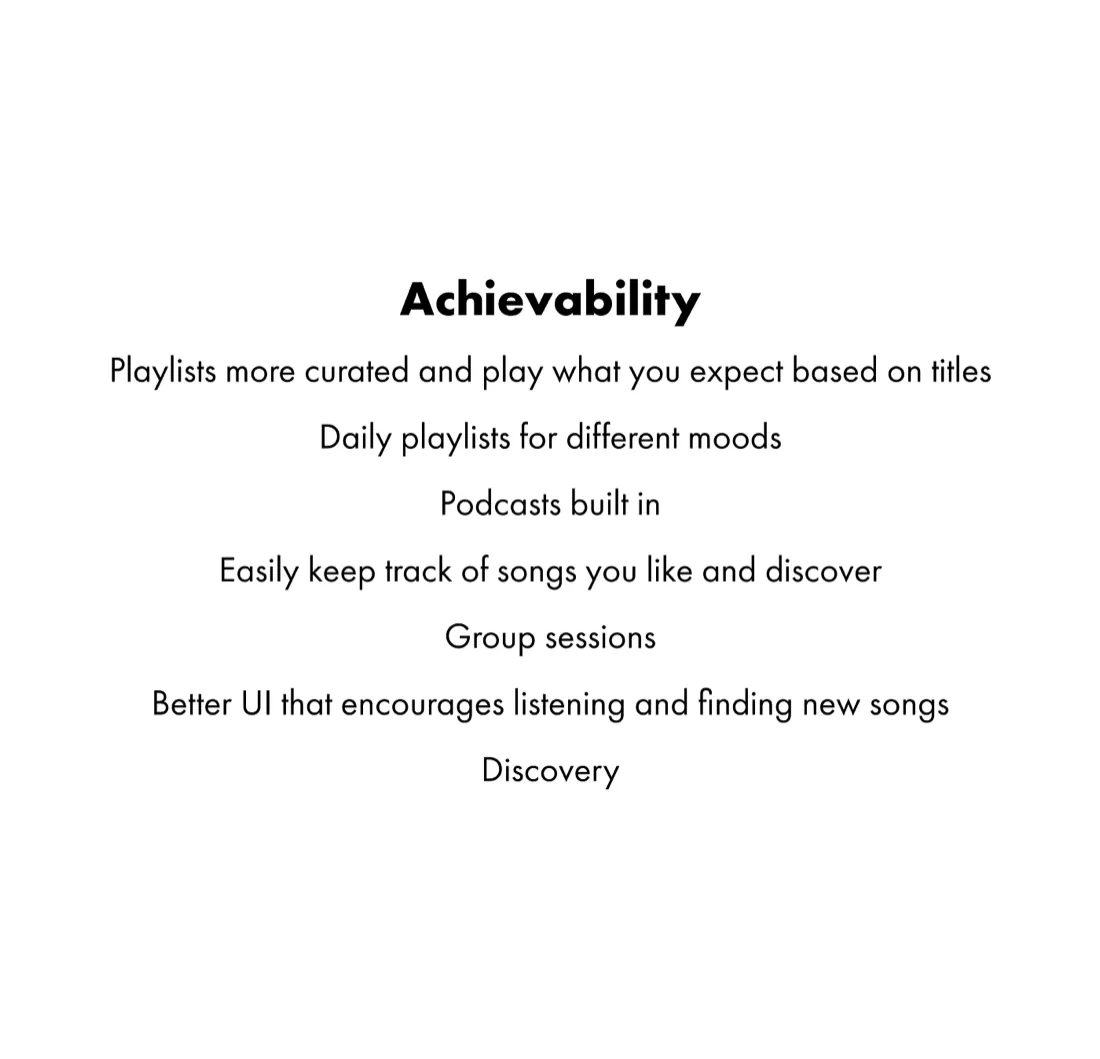
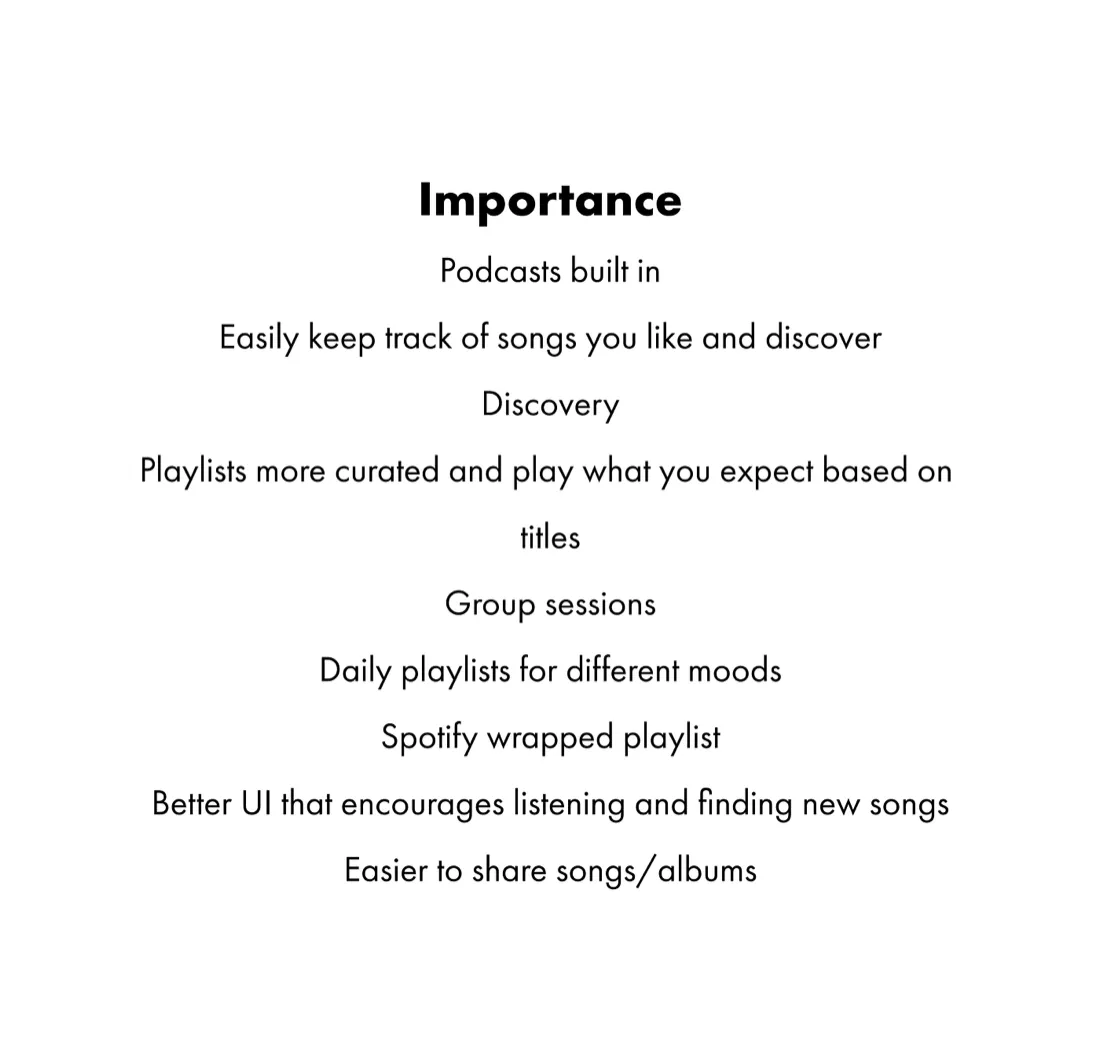
Using these two lists, I created a system that allowed me to determine which problems to tackle in this study. Per list, each item receives points based on how far up or down they are on the list. The first item gets 1 point, the second item gets 2 points, and so on. After each item received its points, you subtract the items that have the same name, and the items that were closest to 0 were the most important and most achievable objectives, so I worked on the first two: Likes and .
Solution
Where’s the Love?
Apple Music lets people mark songs, albums, and playlists as loved, but in the version I reviewed there was no dedicated place to browse all loved items. I treated that as an opportunity to explore, not as evidence that users were leaving the service for this reason.
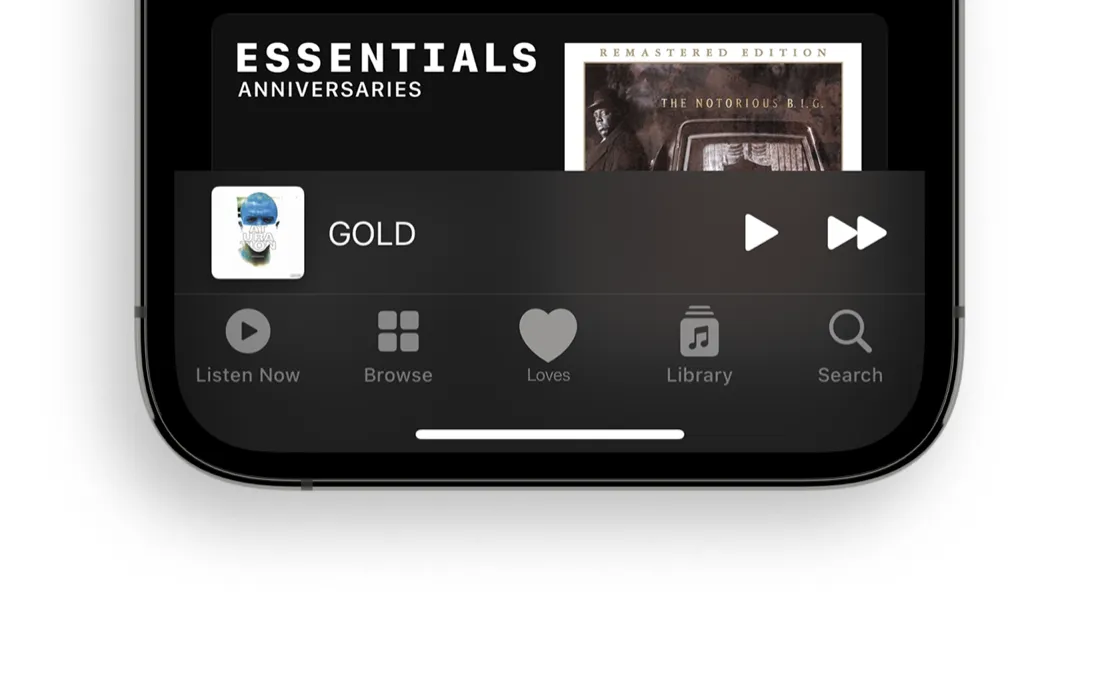
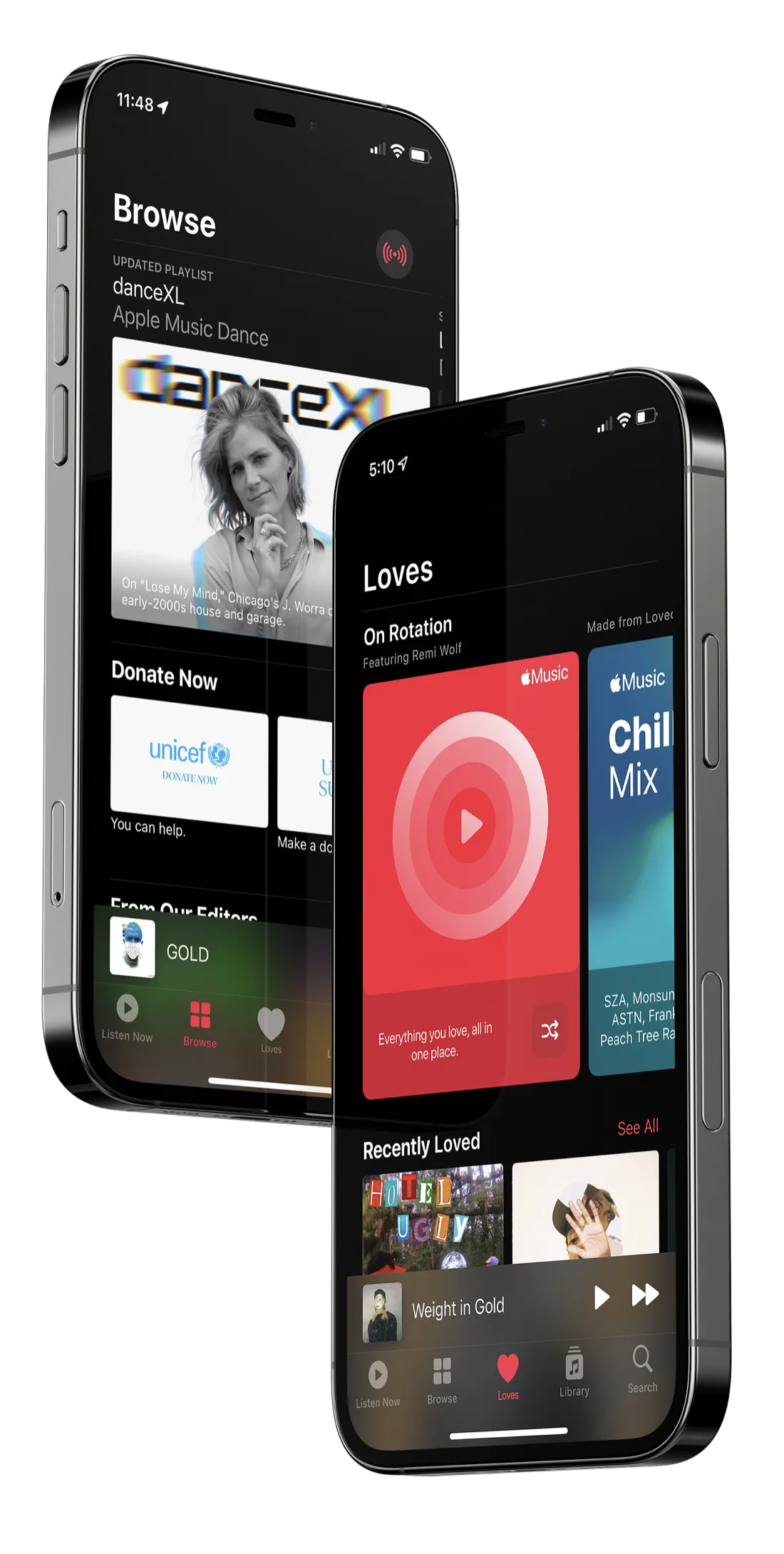
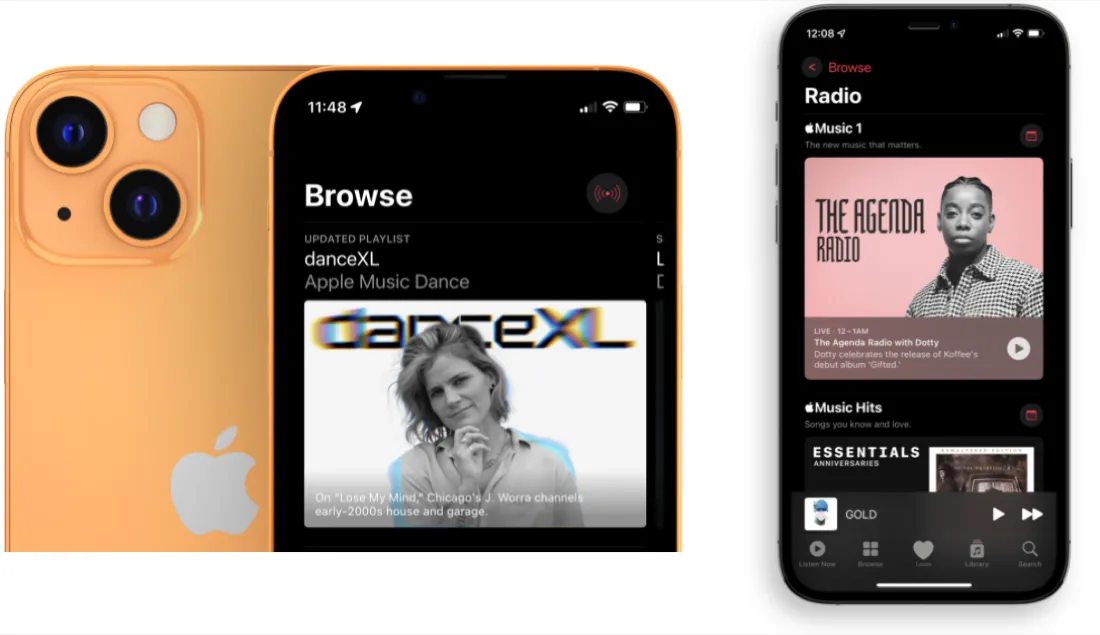
The solution I devised for this problem was to create a new bottom row tab called ‘Loves.’ No longer would the user be clueless about where their mysterious loved songs went. This gave a clear home for everything that you love inside Apple Music. Now, what happens to the radio section that was just wiped away from our user’s home bar? It moves into the browse page. And there is a clear back button so the user doesn’t get stuck or confused on this new page. When you think about looking for music to listen to, sometimes you want that radio. Keeping it in the app and putting it in a subcategory that fits it is why it was moved. Of course, all the same, algorithmically generated suggestions for radio in ‘Listen Now’ will be present.
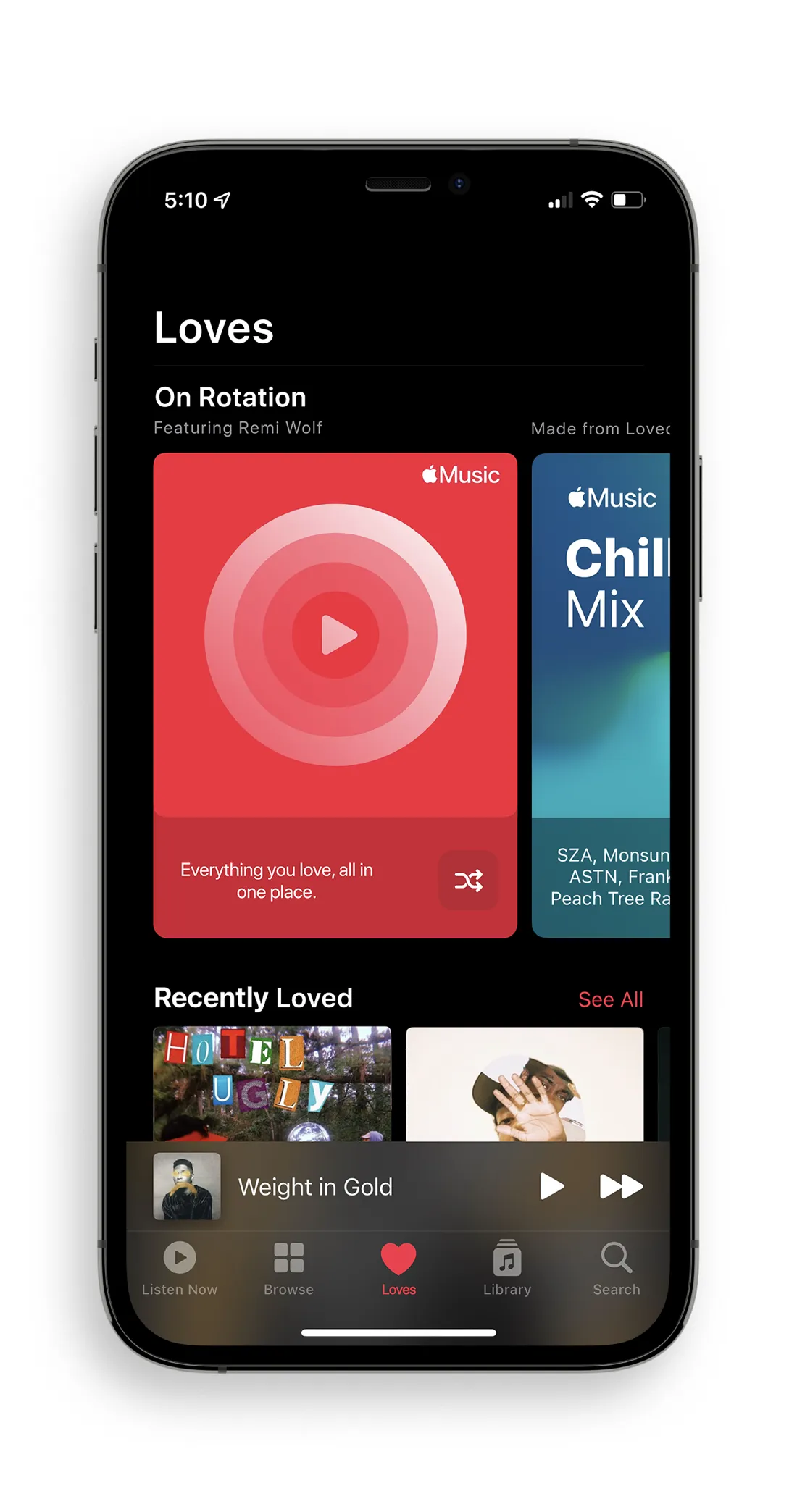
Now that our Radio friend is taken care of, let’s look more into the new ‘Loves’ tab. Thinking solely about the user and what they would want right at their fingertips, the first suggestion they get is the ‘On Rotation playlist. This playlist is procedurally generated from songs that they’ve loved and continue to come back to multiple times. This lets the user not only have a playlist that they will very likely love to listen to, but it will give an easy way to find songs that they want to play again without going to search.
Digging through any UI, even the beautifully designed ones, is everyone’s worst nightmare. Within a music app, users want to find music they want to listen to then close it and be done. That’s why this next section is devoted to the most recently loved items. Whether it be Songs, Playlists, Albums, or Artists, they will show up in the carousel of ‘Recently Loved.’ This gives the user the ability to find what has been relevant to them recently and gives somewhat of a timeline of their recent preferences. Having the section within one click also keeps the decision path simple. Does a user want to find a song they loved just a couple of days ago? Great, all it takes is a tap or a swipe of the carousel and they’ve found it.
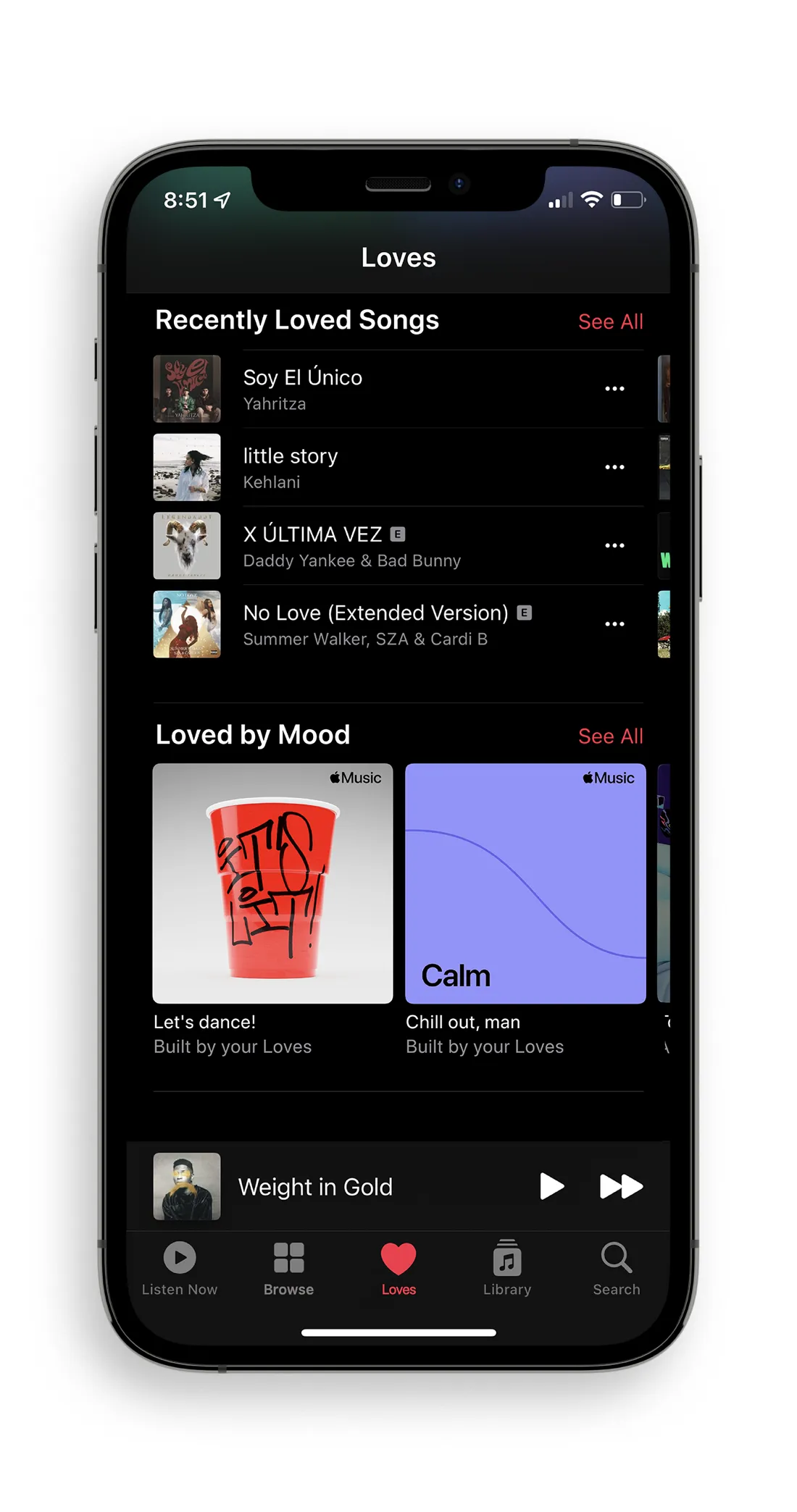
One shortcoming of Apple Music has been its lackluster features. This brings us to the ‘Loved by Mood’ area. This area will create procedurally generated playlists to coincide with an array of different moods. It would determine these mostly from scanning for the song’s beats per minute (BPM). The BPM of a song is usually a good indicator of its mood and energy. The higher the BPM, the quicker the song feels, and most of the time more energetic. The playlists would contain songs the user has loved that fit the category as well as new songs that have similar attributes. This way the user can discover new songs within the category they are listening to and possibly add them to their library of loved songs.
Two’s Company, Three’s a Crowd
When I listened to music with other people, sharing another person’s library could mean disconnecting and pairing a different device. That personal experience led me to explore a shared queue inside the Music app; I did not measure how often this situation occurs for other listeners.
ICYMI, SharePlay was released on iOS 15.1 in December 2021. It allows users to share their screen, tv show, or music all through FaceTime. It is mostly known for its screen sharing ability after coming at the end of a video call (Zoom dominated) year. Nonetheless, Apple did present it with the other features of music and select tv show sharing capabilities.
Currently, SharePlay is already built into the music menu. The only issue is that if you try to add someone to your SharePlay it says that the media type is unable to SharePlay. Although this is not the truth, what they want you to do is be on a FaceTime Audio or Video call in order to use this feature.
The implementation that I would have built allows for users to create a SharePlay session, no matter the context, and share it with up to 15 people. If you weren’t the source user, you would be able to add songs to the queue but not skip or reverse songs. This still allows for control over what the source user’s phone is playing and eliminates a potential headache for all the users. If everyone was given the ability to switch songs, human nature would kick in and there would be a race to get to the song they added.
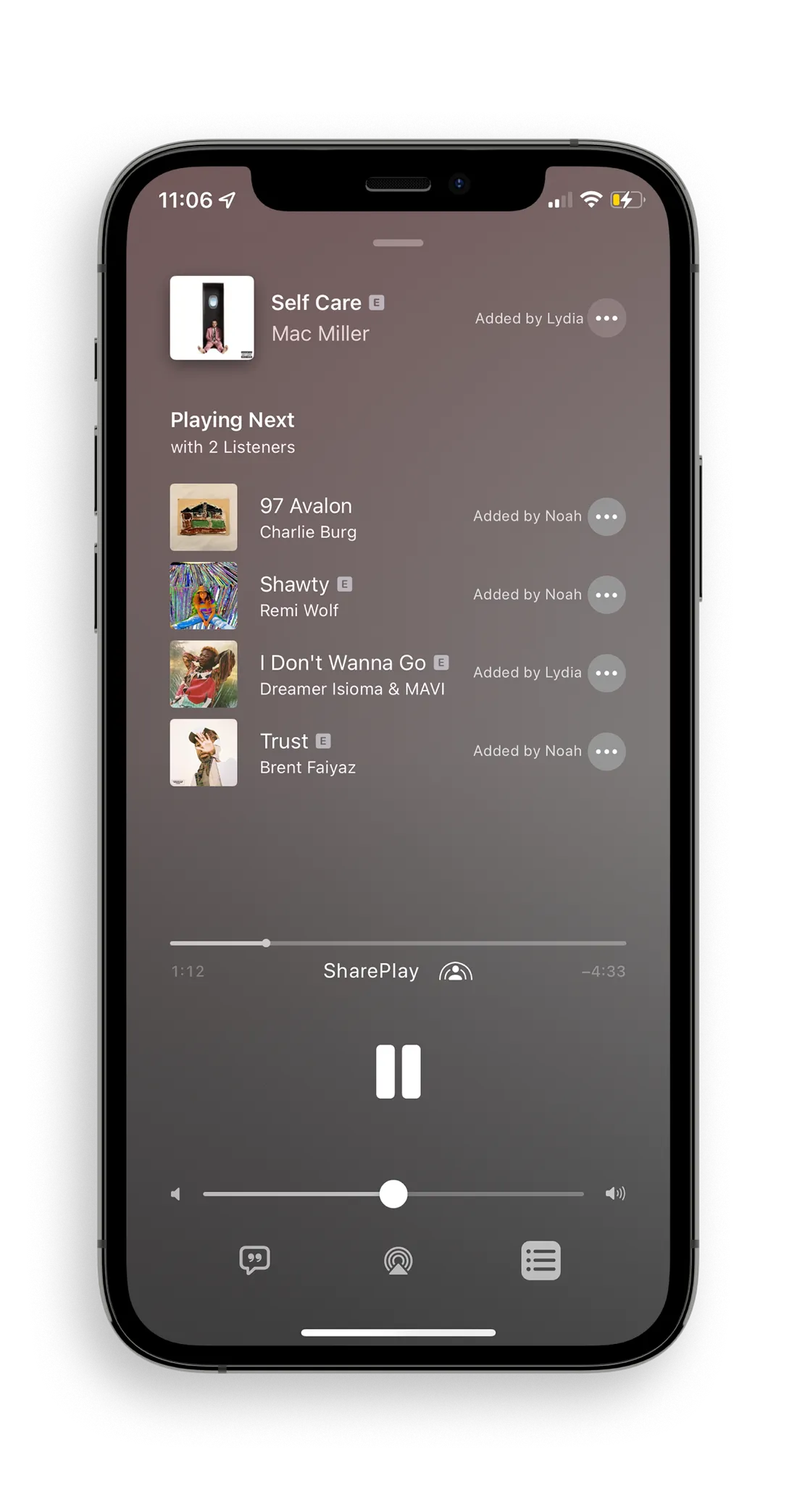
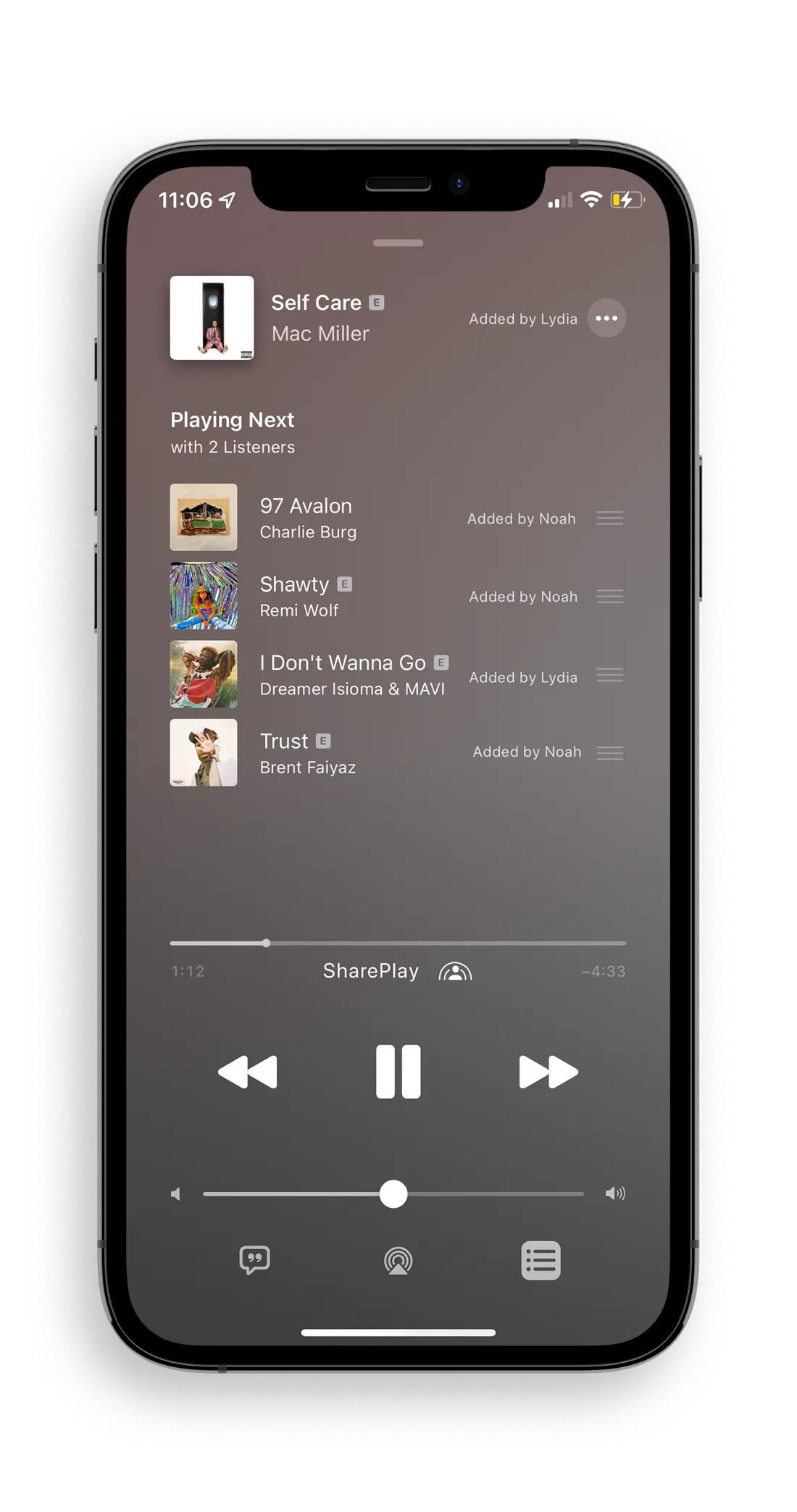
When creating a new system that relies so heavily on the song queue, you have to reconsider how it looks and feels. When looking at the queue, all users are able to see the names of who added which song. Adding a bit of personalization to the queue will create a sense of community and bonding. The queue for the users that don’t have the source phone, will be slightly different. Their queue will show a three-dotted menu next to each song in order to get more information on it, add it to their library, and, of course, love it. Non-source users are also not able to change the order of the queue. This gives a fair chance for each user to play the song they like and have it heard. But, the queue for the source user will look the same and be the ‘admin’ in a sense, able to change the order of songs, delete them from the queue and remove users from the SharePlay session if need be.
Conclusion
This 2022 concept explores a Loves library and shared listening inside Apple Music. I designed the flows and interfaces as proposals; I did not test them with users or measure their effect on satisfaction, retention, or Apple Music’s position against Spotify.
If you’d like to take a closer look at all assets made for this Case Study, find them here. If you’d like to learn more about me and what I’m doing, or get in touch, reach me here.